
Remote work rarely fails because nobody has a task list. It fails when an assignment changes in a chat thread, a decision never reaches the brief, or a handoff gets lost between time zones. The best project management software for remote teams makes ownership, deadlines and context visible without forcing another meeting.
That does not mean one platform fits everyone. A two-person editorial team may need a simple board, while an agency needs client approvals and time records. A software team may care more about issue backlogs than document pages. Pricing also becomes harder to compare once seat minimums, storage caps and paid automation enter the picture.
What Is Project Management Software for Remote Teams?
Project management software is a shared workspace for organizing deliverables, owners, due dates and progress. For remote teams it should also preserve decisions and status asynchronously, so someone starting work in another time zone can understand what changed. Tools differ: some emphasize Kanban boards, others Gantt schedules, client communication, documents or software issues.
How We Selected These 11 Tools
We compared official pricing and product materials for ongoing entry plans, team limits, planning views, handoffs, documentation, external collaborators and likely upgrade triggers. This is a desk-researched editorial comparison, not a laboratory benchmark or hands-on software review. Product labels such as ‘best for’ express workflow fit, not measured winners. Published prices are usually in US dollars and may exclude taxes, usage charges and local terms.
11 Best Project Management Software Tools for Remote Teams
These options solve different collaboration problems. Start with your team’s core workflow rather than the longest feature list.
1. Asana
Best for: Cross-functional projects with accountable handoffs.
A marketing manager can assign launch assets to different specialists while keeping deadlines attached to each deliverable. Instead of a status meeting for every handoff, teammates can see who owns the next step. Asana becomes more useful when projects cross departmental lines and responsibilities need to stay visible.
For a remote team, the main buying question is whether this product gives colleagues enough context to move work forward independently. Test a real handoff, overdue task and guest invitation before deciding on a plan. Compare the exact tier instead of assuming every advertised capability is included.
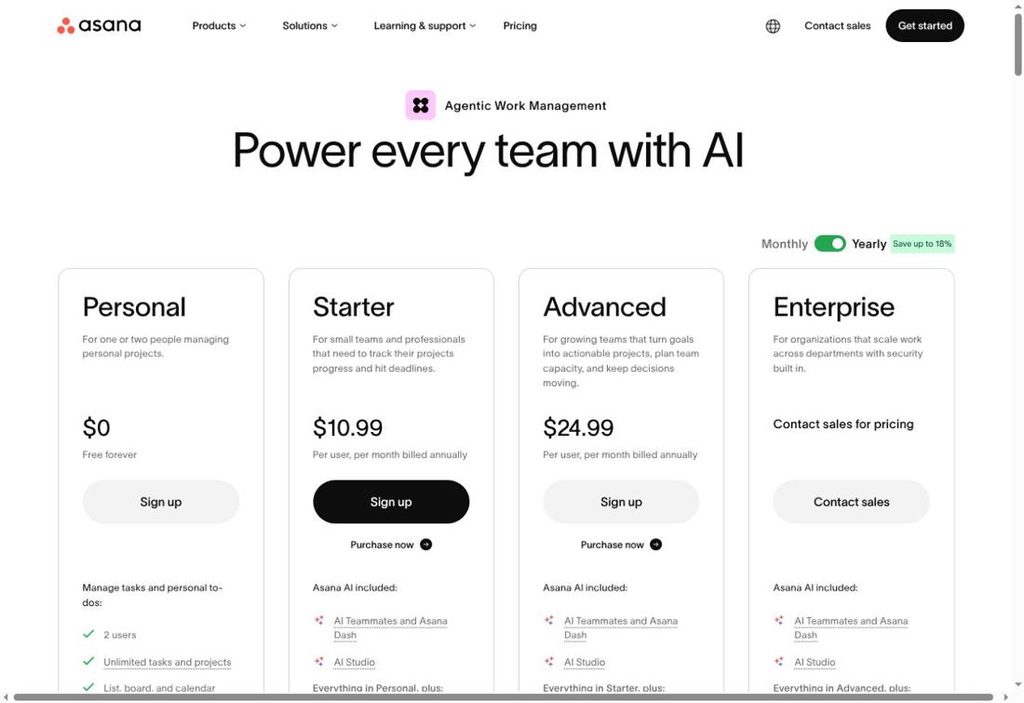
Pricing: Personal is free for up to two collaborators. Starter is $10.99 per user/month when billed annually.
Official website: https://asana.com/pricing
Key Features
The following capabilities are documented on the referenced official product and pricing pages; certain capabilities are plan dependent.
- Tasks with owners and due dates
- List view
- Board view
- Calendar view
- Status updates
- Integrations
Pros
Practical advantages based on published product design, not independent hands-on testing.
- Clear task ownership
- Multiple planning views
- Generous task allowance
- Useful cross-team structure
- Free starting option
Cons
Important trade-offs to evaluate before subscribing.
- Personal plan covers only two users
- Timeline, Gantt, forms and advanced reporting require Starter or above
2. ClickUp
Best for: Teams consolidating tasks, docs and sprint work.
A distributed product team might want its sprint backlog, meeting notes and launch checklist in one workspace. ClickUp can accommodate several work styles, but a team that needs only a simple task board should test whether the additional structure helps or slows down updates.
For a remote team, the main buying question is whether this product gives colleagues enough context to move work forward independently. Test a real handoff, overdue task and guest invitation before deciding on a plan. Compare the exact tier instead of assuming every advertised capability is included.
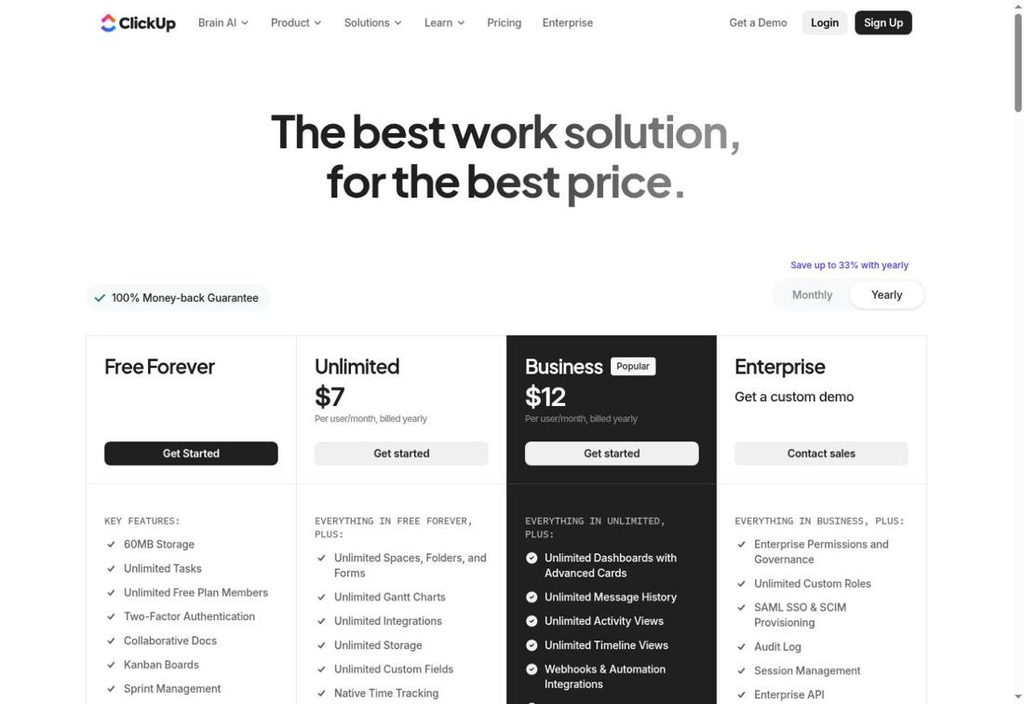
Pricing: Free Forever is available; Unlimited is listed from $7 per user/month billed annually.
Key Features
The following capabilities are documented on the referenced official product and pricing pages; certain capabilities are plan dependent.
- Unlimited tasks on Free
- Collaborative docs
- Kanban boards
- Calendar view
- Sprint management
- In-app video recording
Pros
Practical advantages based on published product design, not independent hands-on testing.
- Broad functionality
- Supports technical and nontechnical work
- Docs live near tasks
- Flexible views
- Free tier has unlimited members
Cons
Important trade-offs to evaluate before subscribing.
- Free tier lists only 60MB storage
- Breadth of settings can make adoption demanding
3. monday.com
Best for: Visual operations and repeatable workflows.
For an operations team handling incoming requests, a board can show owner, priority and progress without requiring everyone to join a call. Its configurable columns are an advantage when work follows a repeatable path, though teams should map the process first rather than create a complicated board for every task.
For a remote team, the main buying question is whether this product gives colleagues enough context to move work forward independently. Test a real handoff, overdue task and guest invitation before deciding on a plan. Compare the exact tier instead of assuming every advertised capability is included.
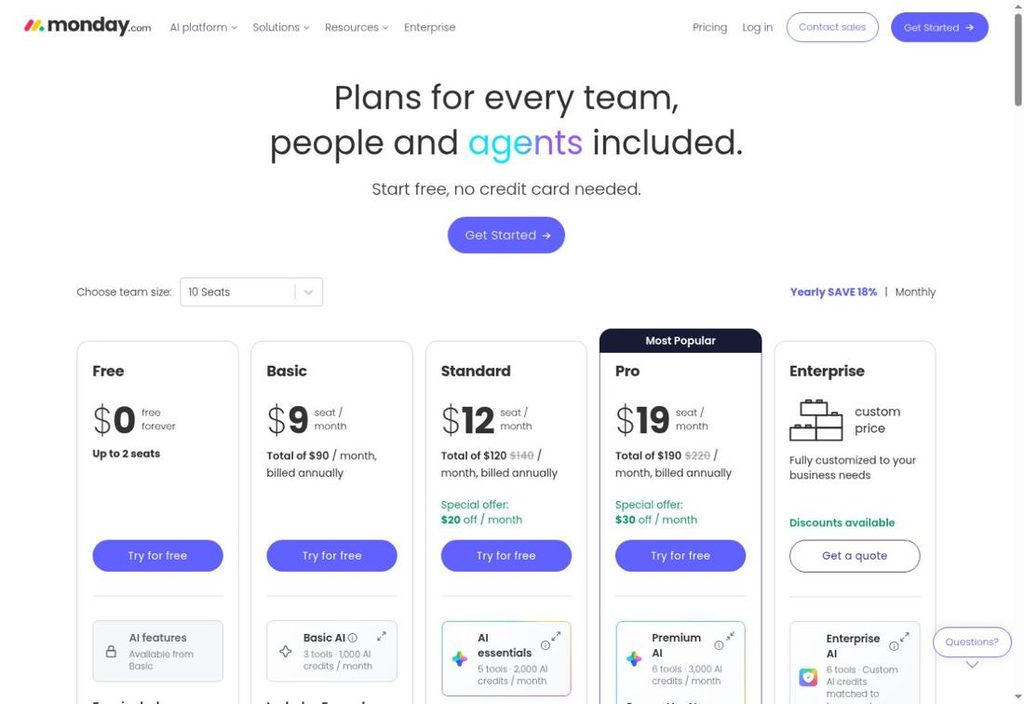
Pricing: An ongoing Free plan exists. Paid subscription amounts were not reliably verified for this comparison.
Key Features
The following capabilities are documented on the referenced official product and pricing pages; certain capabilities are plan dependent.
- Main boards
- Item updates and @mentions
- Kanban view
- Forms view
- Workdocs
- Files view
Pros
Practical advantages based on published product design, not independent hands-on testing.
- Visual approach
- Inline communication
- Intake forms
- Document collaboration
- Different workflow layouts
Cons
Important trade-offs to evaluate before subscribing.
- Free tier starts with three boards and 200 items
- Broader search and more advanced features require paid plans
4. Trello
Best for: Lightweight Kanban work with minimal training.
A content team can arrange cards across Ideas, Drafting, Review and Published. Each person sees the same queue even when they work in different time zones. Trello is particularly effective when the workflow is visible on one board; complex resource allocation may call for a more planning-oriented product.
For a remote team, the main buying question is whether this product gives colleagues enough context to move work forward independently. Test a real handoff, overdue task and guest invitation before deciding on a plan. Compare the exact tier instead of assuming every advertised capability is included.
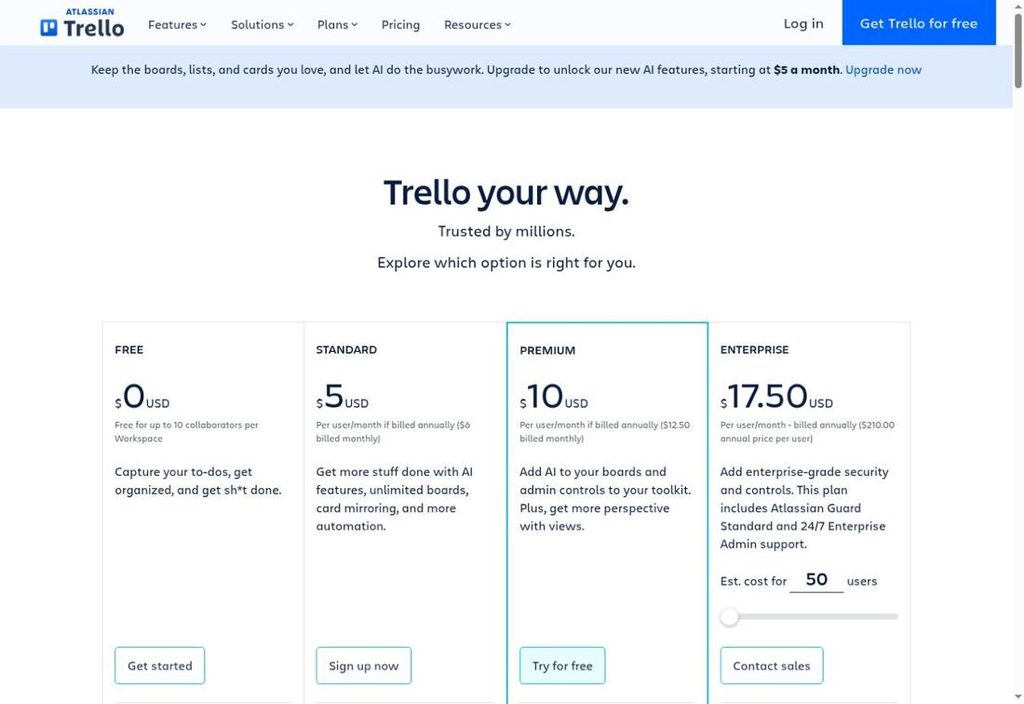
Pricing: Free for up to ten collaborators per Workspace; Standard starts at $5 and Premium at $10 per user/month with annual billing.
Key Features
The following capabilities are documented on the referenced official product and pricing pages; certain capabilities are plan dependent.
- Unlimited cards
- Ten free boards per Workspace
- Task assignees
- Due dates
- Activity log
- Automation commands
Pros
Practical advantages based on published product design, not independent hands-on testing.
- Easy board metaphor
- Quick setup
- Visible task stages
- Works well for small teams
- Useful free starting tier
Cons
Important trade-offs to evaluate before subscribing.
- Free Workspace collaborator and board caps
- Advanced views and administrative controls require higher plans
5. Notion
Best for: Documentation-led remote collaboration.
Remote teams often lose the reason behind a decision while preserving only the task. Notion helps keep briefs, meeting notes and action items connected. Teams should agree on a modest database structure and naming convention, otherwise flexibility can turn into several competing sources of truth.
For a remote team, the main buying question is whether this product gives colleagues enough context to move work forward independently. Test a real handoff, overdue task and guest invitation before deciding on a plan. Compare the exact tier instead of assuming every advertised capability is included.
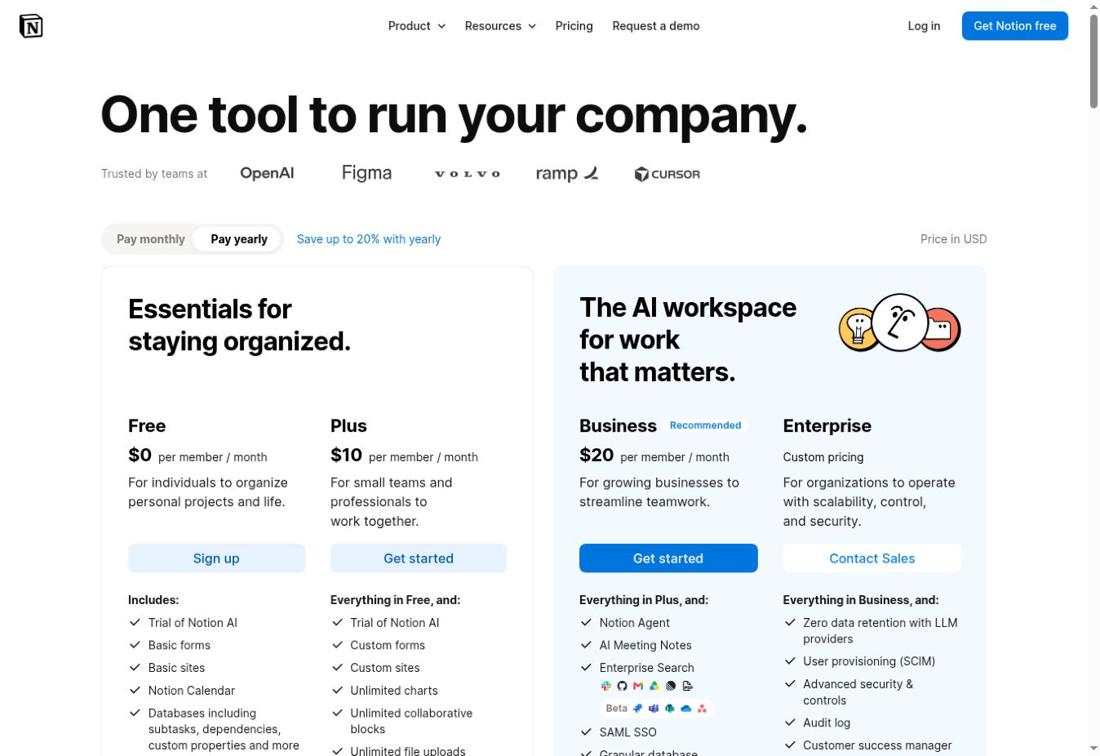
Pricing: Free is $0; Plus is listed at $10 per seat/month on the reviewed page, subject to billing selection.
Key Features
The following capabilities are documented on the referenced official product and pricing pages; certain capabilities are plan dependent.
- Pages and linked databases
- Subtasks and dependencies
- Custom properties
- Forms
- Public API
- Content publishing
Pros
Practical advantages based on published product design, not independent hands-on testing.
- Documents and projects together
- Flexible internal wiki
- Custom database views
- Supports asynchronous context
- Pages can link to decisions
Cons
Important trade-offs to evaluate before subscribing.
- Free workspaces with two or more members have block limits
- Free file uploads limited to 5MB per file
6. Basecamp
Best for: Client communication and calm async coordination.
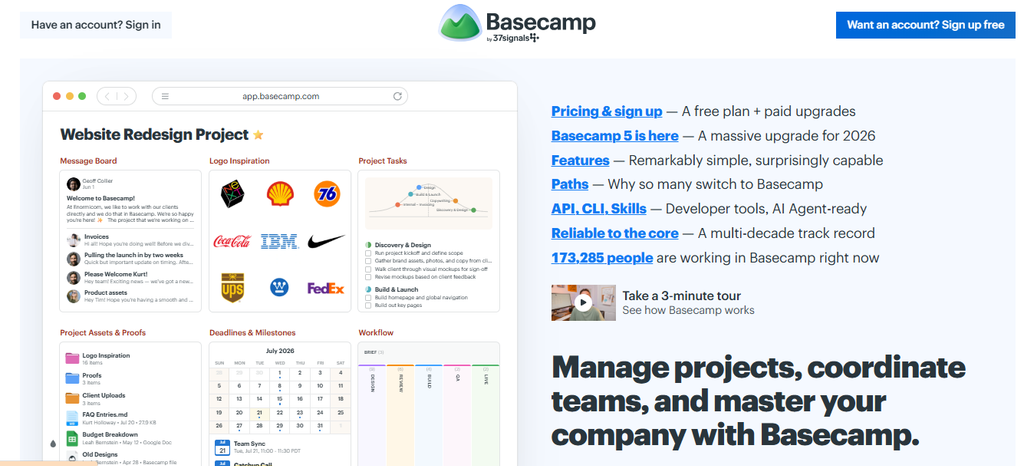
An agency working with outside clients can keep approvals, task lists and conversation history attached to each job. Basecamp prioritizes shared context over elaborate configuration. That simplicity may suit service teams, but organizations relying on deep portfolio forecasting should compare alternatives carefully.
For a remote team, the main buying question is whether this product gives colleagues enough context to move work forward independently. Test a real handoff, overdue task and guest invitation before deciding on a plan. Compare the exact tier instead of assuming every advertised capability is included.
Pricing: Free supports one project and up to five users; Freelancer is $25/month, Studio $59/month and Pro $99/month under published plan terms.
Key Features
The following capabilities are documented on the referenced official product and pricing pages; certain capabilities are plan dependent.
- Project spaces
- To-do lists
- Message boards
- Chat
- Project templates
- Time tracking
Pros
Practical advantages based on published product design, not independent hands-on testing.
- Flat-rate paid options
- Communication near work
- Straightforward projects
- Useful for clients and collaborators
- Low meeting dependence
Cons
Important trade-offs to evaluate before subscribing.
- Free plan allows only one project
- Higher-capacity plans and storage require upgrading
7. Teamwork
Best for: Remote agencies tracking client delivery and hours.
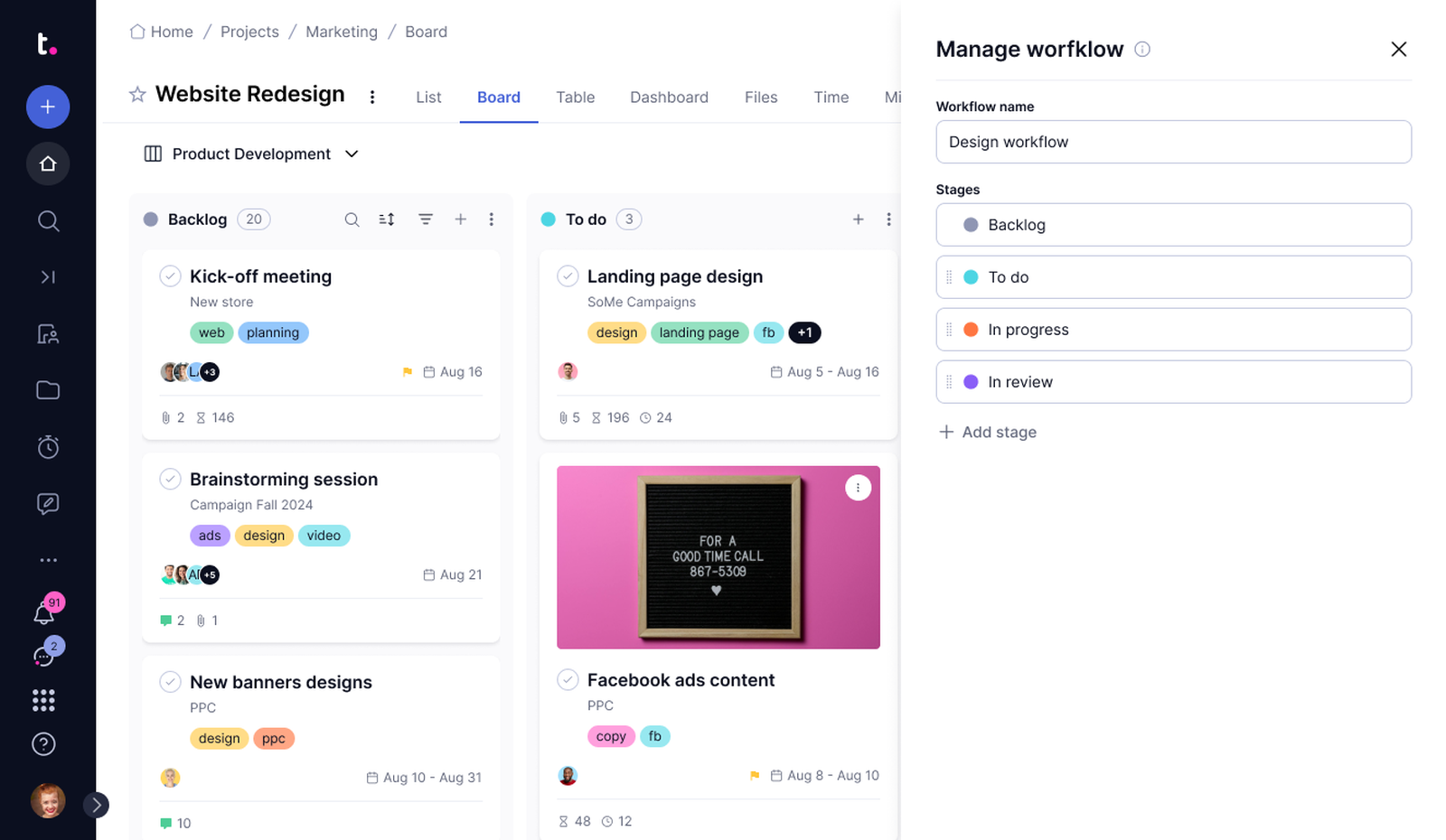
A consultancy needs more than a list of due dates: it must know which client receives a deliverable and how much team time the job consumes. Teamwork makes that context central. Its value is strongest when billing, deadlines and collaboration need to be considered together.
For a remote team, the main buying question is whether this product gives colleagues enough context to move work forward independently. Test a real handoff, overdue task and guest invitation before deciding on a plan. Compare the exact tier instead of assuming every advertised capability is included.
Pricing: Free supports up to five projects and five users. Basics begins at $9.99 per user/month billed yearly.
Key Features
The following capabilities are documented on the referenced official product and pricing pages; certain capabilities are plan dependent.
- Task and list views
- Board view
- Gantt view
- Time logging
- Client organization
- Automations
Pros
Practical advantages based on published product design, not independent hands-on testing.
- Designed around client work
- Time logs alongside tasks
- Free entry plan
- Several project views
- Client organization
Cons
Important trade-offs to evaluate before subscribing.
- Free edition has a five-project cap
- Deeper budgeting and workload features are in higher plans
8. Wrike
Best for: Structured team workflows with schedule visibility.
If several departments need to deliver parts of the same initiative, Wrike’s schedule views help show how activities relate. It is more compelling for teams needing a managed sequence of work than for one-person task lists; pay attention to the boundary between its free and Team capabilities.
For a remote team, the main buying question is whether this product gives colleagues enough context to move work forward independently. Test a real handoff, overdue task and guest invitation before deciding on a plan. Compare the exact tier instead of assuming every advertised capability is included.
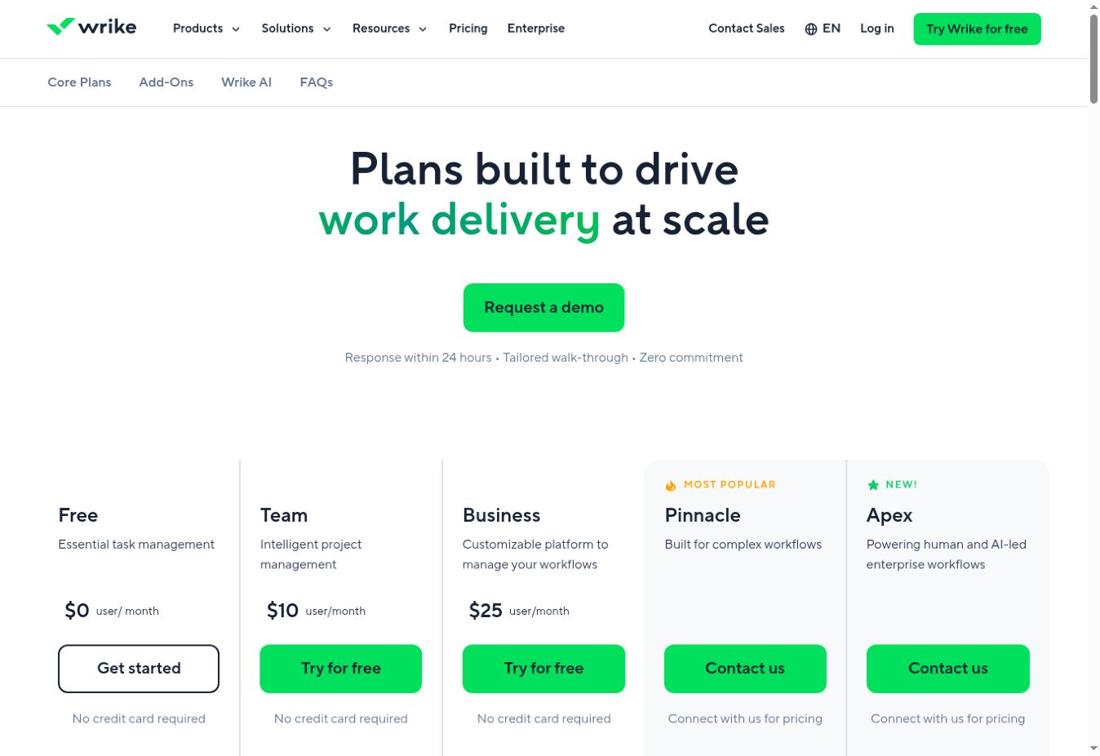
Pricing: Team is displayed at $10 per user/month for two to fifteen users; verify billing requirements before purchase.
Key Features
The following capabilities are documented on the referenced official product and pricing pages; certain capabilities are plan dependent.
- Tasks
- Table view
- Team collaboration
- Shareable dashboards on Team
- Interactive Gantt on Team
- AI assistance on Team
Pros
Practical advantages based on published product design, not independent hands-on testing.
- Structured task tracking
- Schedule visualization
- Shareable progress dashboards
- Useful for coordinated teams
- Supports increasing complexity
Cons
Important trade-offs to evaluate before subscribing.
- Team plan starts at two seats
- Gantt and dashboard access require a paid tier
9. Zoho Projects
Best for: Budget-conscious teams needing formal project controls.
A small remote implementation team can begin with assignments and subtasks, then move to timesheets and project budgets as delivery grows more formal. Zoho Projects is worth comparing when predictable subscription cost matters, although integration value depends on the tools a team already uses.
For a remote team, the main buying question is whether this product gives colleagues enough context to move work forward independently. Test a real handoff, overdue task and guest invitation before deciding on a plan. Compare the exact tier instead of assuming every advertised capability is included.
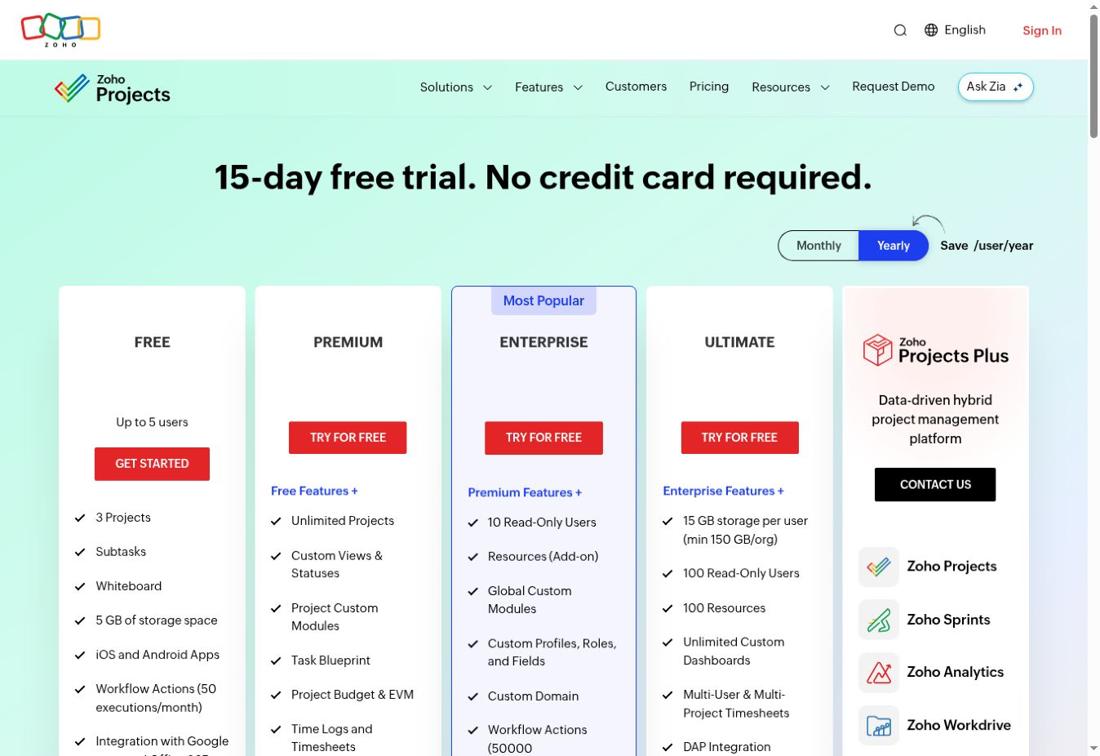
Pricing: Free supports five users and three projects; Premium starts at $4 per user/month billed annually.
Key Features
The following capabilities are documented on the referenced official product and pricing pages; certain capabilities are plan dependent.
- Tasks and subtasks
- Whiteboard
- Mobile apps
- Google and Office integrations
- Workflow actions
- Project storage
Pros
Practical advantages based on published product design, not independent hands-on testing.
- Low published entry price
- Five-user free tier
- Task structure
- Ecosystem integrations
- Timesheets available on Premium
Cons
Important trade-offs to evaluate before subscribing.
- Free plan limited to three projects
- Budgeting and more advanced time tracking require Premium or higher
10. Linear

Best for: Engineering teams running issue and sprint workflows.
A distributed engineering group can keep bugs, feature requests and releases in a shared issue workflow rather than scattered conversations. Linear is a targeted choice for product and software delivery. General operations teams should assess whether its engineering vocabulary matches how they work.
For a remote team, the main buying question is whether this product gives colleagues enough context to move work forward independently. Test a real handoff, overdue task and guest invitation before deciding on a plan. Compare the exact tier instead of assuming every advertised capability is included.
Pricing: Free includes unlimited members but two teams and 250 issues; Basic is $10 per user/month billed annually.
Key Features
The following capabilities are documented on the referenced official product and pricing pages; certain capabilities are plan dependent.
- Issue tracking
- Two teams on Free
- Project organization
- Agent platform
- Issue collaboration
- Software workflow integrations
Pros
Practical advantages based on published product design, not independent hands-on testing.
- Engineering-first focus
- Clear issue ownership
- Unlimited Free members
- Small-team entry option
- Structured prioritization
Cons
Important trade-offs to evaluate before subscribing.
- Free plan has a 250-issue limit
- Less naturally suited to nontechnical business workflows
11. Smartsheet

Best for: Spreadsheet-oriented program and project tracking.
Teams coming from spreadsheet trackers can adopt structured forms and timelines without giving up the grid view they understand. Smartsheet is useful for coordinated schedules and recurring status reports, but costs and permission arrangements deserve scrutiny when many collaborators only need occasional access.
For a remote team, the main buying question is whether this product gives colleagues enough context to move work forward independently. Test a real handoff, overdue task and guest invitation before deciding on a plan. Compare the exact tier instead of assuming every advertised capability is included.
Pricing: Pro displays $9 per member/month billed yearly or $12 on monthly billing; Business displays $19 annually or $24 monthly.
Key Features
The following capabilities are documented on the referenced official product and pricing pages; certain capabilities are plan dependent.
- Grid and table views
- Gantt view
- Board view
- Calendar view
- Forms
- Formulas and reports
Pros
Practical advantages based on published product design, not independent hands-on testing.
- Familiar grid model
- Reporting and forms
- Project schedules
- Multiple visualization options
- Configurable formulas
Cons
Important trade-offs to evaluate before subscribing.
- No comparable perpetual Free tier shown on the reviewed pricing page
- Advanced workload tracking sits in Business
Remote Project Management Software Comparison
Prices are published entry points, primarily USD; annual-billing equivalents should not be treated as month-to-month terms. ‘Free’ means there is an ongoing free tier, not that every feature is free.
| Tool | Best fit | Free option | Published paid entry / caveat |
|---|---|---|---|
| Asana | Cross-functional projects with accountable handoffs | Yes | Personal is free for up to two collaborators. Starter is $10.99 per user/month when billed annually. |
| ClickUp | Teams consolidating tasks, docs and sprint work | Yes | Free Forever is available; Unlimited is listed from $7 per user/month billed annually. |
| monday.com | Visual operations and repeatable workflows | Yes | An ongoing Free plan exists. Paid subscription amounts were not reliably verified for this comparison. |
| Trello | Lightweight Kanban work with minimal training | Yes | Free for up to ten collaborators per Workspace; Standard starts at $5 and Premium at $10 per user/month with annual billing. |
| Notion | Documentation-led remote collaboration | Yes | Free is $0; Plus is listed at $10 per seat/month on the reviewed page, subject to billing selection. |
| Basecamp | Client communication and calm async coordination | Yes | Free supports one project and up to five users; Freelancer is $25/month, Studio $59/month and Pro $99/month under published plan terms. |
| Teamwork | Remote agencies tracking client delivery and hours | Yes | Free supports up to five projects and five users. Basics begins at $9.99 per user/month billed yearly. |
| Wrike | Structured team workflows with schedule visibility | Yes | Team is displayed at $10 per user/month for two to fifteen users; verify billing requirements before purchase. |
| Zoho Projects | Budget-conscious teams needing formal project controls | Yes | Free supports five users and three projects; Premium starts at $4 per user/month billed annually. |
| Linear | Engineering teams running issue and sprint workflows | Yes | Free includes unlimited members but two teams and 250 issues; Basic is $10 per user/month billed annually. |
| Smartsheet | Spreadsheet-oriented program and project tracking | Not shown on reviewed page | Pro displays $9 per member/month billed yearly or $12 on monthly billing; Business displays $19 annually or $24 monthly. |
How to Choose the Right Platform
First map one real workflow: a request arrives, someone assigns it, the work is reviewed, and a decision is recorded. Choose a tool that supports that sequence without requiring messages in three other places. Then count real members, clients and occasional guests; vendors price these roles differently. Calculate the total annual commitment rather than multiplying a headline figure without checking seat minimums. Finally, test notification noise, mobile access, exports, retention and permissions with a pilot team before migration.
- Choose boards for a visible pipeline; choose Gantt when dependencies and scheduling matter.
- Use documents and decision history when asynchronous context is the bottleneck.
- For agency work, test external guest approvals and time accounting.
- For engineering, compare issue lifecycle, triage and integrations.
- Review storage, automations, AI usage charges, export and access control by plan.
Frequently Asked Questions
Which project management tool is easiest for a small remote team?
Trello is a reasonable starting point for a straightforward board workflow. Asana may be preferable when even small projects need clearer assignment structure. Pilot an actual job rather than selecting by interface alone.
Which tool is best for a remote software team?
Linear emphasizes issues and engineering workflows. ClickUp provides broader work management, including sprint features. Your backlog process and reporting needs should determine the choice.
Can a remote team manage projects for free?
Yes, several products offer ongoing free tiers. Check collaborator, board, issue, project, storage and automation limits; a free plan can become restrictive before headcount grows.
Is Notion a replacement for a dedicated project manager?
Notion can connect documents with database-driven task tracking. Teams needing complex resource allocation, schedule controls or formal portfolio reporting may prefer a more specialized platform.
What matters most when people work across time zones?
Visible ownership, deadlines with clear timezone conventions, written decisions and a dependable source of project status. Software helps, but teams must agree on how updates and escalations are recorded.
Should we pay annually for project management software?
Only after a pilot confirms the fit. Annual plans often reduce advertised per-month cost but increase commitment. Check cancellation, minimum seats, add-ons and export options first.
Final Verdict
For straightforward visual task flow, start with Trello. For broad cross-functional ownership, compare Asana with ClickUp. For documentation-heavy teams, Notion is a strong shortlist candidate; for client delivery, compare Teamwork and Basecamp. Linear is purpose-built for engineering-oriented work, while Zoho Projects offers a low advertised paid entry price. monday.com, Wrike and Smartsheet merit attention when visual workflows, structured coordination or grid-based reporting match your team. This is a fit-based recommendation, not a tested ranking.