

You have leads in email, notes in your phone, and deals in a spreadsheet. Now you need one place to track them, and you do not want a bill. Finding the Best Free CRM Software is hard because many “free” plans stop working the moment your list grows.
This guide compares 10 free CRM tools side by side. Each one was judged on what the free plan really lets you do, how fast a small team can set it up, and where the limits hit. You will see who each tool suits, from solo freelancers to teams that want to host their own system.
Read the tool sections that match your size and workflow. Then test your top two with real contacts before you commit.
What Is Free CRM Software?
Free CRM software stores your contacts, tracks your deals, and reminds you to follow up. Most tools also log emails and calls, and show your pipeline as a simple board. The free plan is usually a limited version of a paid product, or an open-source tool you install yourself.
Anyone who sells to people needs one. A freelancer with ten clients can get by on a spreadsheet, but a small team losing track of replies cannot. Industry needs differ too. For example, if you are working out how to choose a CRM for real estate agents, look for lead capture, text or call logging, and easy follow-up reminders. Agents who also track commissions and expenses may want to pair a CRM with real estate accounting software.
Before you pick, check four things. First, the user and contact limits on the free plan. Next, whether email sync and automation are included or locked. Then look at reporting, since many free plans hide it. Last, find out what the first paid tier costs, so an upgrade does not surprise you.Back to contents
Top 10 Best Free CRM Software Tools in 2026
I chose these tools by looking at what each free plan includes, how easy it is to start, and how clear the path is if you outgrow it. They are ordered by how well the free version works for the widest range of small teams, with more specialized and self-hosted options toward the end. Features and limits change, so confirm current plan details on each vendor’s site before you sign up.
1. HubSpot CRM

HubSpot CRM is a contact, deal and pipeline tool that costs nothing to start. The free core is not a short trial. You can store contacts, track deals, log emails and calls, and add team members without hitting a paywall on day one.
It ranks first because the free version feels finished. The interface is clean, setup takes an afternoon, and most new users can build a pipeline without reading a manual. Compared with Zoho CRM, HubSpot asks for less setup time, but Zoho gives you more room to bend fields and rules to your own process.
The real edge is the ecosystem. You can start with plain contact tracking, then add email marketing, forms, chat and sales automation from the same vendor when the team grows. If you already use sales intelligence tools for prospect data, HubSpot is a solid place to keep the results. Just expect the upgrade bill to climb fast once you leave the free tier.
✅ Key Features
- Free contact and deal management: You can track leads and customers from day one without paying per seat for the basics.
- Visual deal pipeline: Drag-and-drop stages show where every deal stands at a glance.
- Email and call logging: Conversations attach to the contact record, so nobody has to hunt through inboxes.
- Meeting scheduler: Prospects book time on your calendar without back-and-forth emails.
- Forms and live chat: Website visitors become contacts automatically, which saves manual data entry.
- Add-on hubs: Marketing, sales and service tools plug into the same record when you are ready to grow.
✅ Pros
- The free plan covers real daily work, so a small team can run on it for months.
- The interface is easy to learn, which cuts training time for new hires.
- Contact data sits in one place, so sales and marketing see the same history.
- A large app marketplace and plenty of guides make problems easy to solve.
- You can add paid features one at a time instead of switching tools later.
❌ Cons
- Automation, reporting depth and sequences mostly sit behind paid plans, so the free tier will feel limiting for busy sales teams.
- Paid tiers cost much more than most rivals once you add marketing or sales hubs.
- Customization is more limited than in Zoho CRM or self-hosted options like EspoCRM.
- Free users see HubSpot branding on forms and emails, which some businesses will not want.
🎯 Best For: Small teams and startups that want a polished free CRM today and expect to add marketing and sales automation later. It fits a three-person agency tracking leads from a website form as well as it fits a small sales team moving off spreadsheets.
2. Zoho CRM

Zoho CRM – Customizable CRM with automation that grows with you
Zoho CRM is a full CRM from Zoho, a company that sells dozens of business apps. It has a free plan for very small teams, and paid plans are priced low compared with most big-name rivals. It ranks second here because it gives you tools most free CRMs hide behind a paywall or leave out entirely.
The main difference is depth. HubSpot CRM is easier to pick up on day one, but Zoho lets you change far more: custom fields, modules, layouts and automated rules. If you expect your sales process to get messy, Zoho gives you room to build around it instead of bending your process to fit the tool.
That comes with a cost in setup time. Plan an afternoon to set up your fields and stages before you add a single deal. Free plan limits on users and features change over time, so check Zoho’s current pricing page before you commit.
✅ Key Features
- Custom modules and fields: you can track data that standard CRMs ignore, such as job sites, policy renewals or event dates.
- Workflow rules: routine steps like assigning leads or sending a reminder run on their own, which saves hours each week.
- Sales pipeline management: you can set up stages that match how your team really sells and move deals through them visually.
- Email and contact tracking: you see who got what message, so follow-ups are based on facts instead of memory.
- Reports and dashboards: you can build views of pipeline and team activity without exporting data to a spreadsheet.
- Connection with other Zoho apps: you can add tools for finance, support or marketing later without moving your data.
✅ Pros
- You can start on a free plan and add advanced features later without switching systems.
- Customization goes deeper than in most CRMs at this price level.
- Automation can replace manual data entry and reminder tasks for a small team.
- Paid plans cost less than comparable tiers from many larger vendors.
- Because the wider Zoho family is large, one vendor can cover several business needs over time.
❌ Cons
- The interface has many menus and options, so new users often feel lost in the first week.
- Powerful setup options mean someone has to own the configuration, or the CRM turns messy fast.
- The free plan is small, and the best automation and reporting tools sit on paid plans.
- Support quality depends on your plan, so a free user should expect to rely on help articles and forums.
🎯 Best For: Budget-conscious small businesses, such as an agency or a service company, that want a cheap start but expect to need custom fields and automation within a year.
3. Bitrix24

Bitrix24 – CRM, tasks, and team chat in one workspace
Bitrix24 is a CRM that comes bundled with a full set of work tools. The free plan covers contacts, deals, tasks, group chat, video calls, and shared files. Most free CRMs give you a pipeline and stop there, so this is a much bigger starting kit.
It ranks third because it can replace several apps at once. A ten-person agency, for example, can track leads, assign client tasks, and chat with the team without paying for a separate project tool. HubSpot CRM has a cleaner CRM and a bigger marketing ecosystem, but Bitrix24 gives you more team and project features on the free tier.
The trade-off is a busier product. Capsule CRM is far simpler if all you need is a contact list and a pipeline. Pick Bitrix24 when your team wants one login for sales and daily work, and you are willing to spend a week learning the menus.
✅ Key Features
- Built-in CRM: Track leads, deals, and contacts in a pipeline view so sales work stays organized.
- Task and project tools: Turn a closed deal into assigned tasks without leaving the platform.
- Team chat and video calls: Talk to coworkers inside the same system where customer records live.
- Shared file storage: Keep proposals and contracts attached to the team workspace for easy access.
- Workflow automation: Set up rules that move work along, though the free plan limits how far you can go.
- Mobile and desktop apps: Check deals and reply to teammates when you are away from your desk.
✅ Pros
- The free plan includes both CRM and collaboration tools, so you can skip a second subscription at the start.
- Tasks link to deals, which keeps sales and delivery work in one place.
- Built-in chat and calls cut down on switching between apps.
- It suits mixed teams where sales, support, and operations all need access.
- Paid plans exist if you outgrow the free tier, so you do not have to move systems right away.
❌ Cons
- The interface is crowded, and new users often need time to find basic settings.
- Free plan limits on users, storage, and advanced CRM features can force an upgrade sooner than expected.
- Solo users and tiny sales teams will pay in complexity for tools they never open.
- Reporting and automation on the free tier are thinner than what Zoho CRM offers for CRM-only needs.
🎯 Best For: Small teams of about five to fifteen people who want sales tracking and project management in one workspace. A service business that sells a project and then delivers it will get the most from it.
4. Capsule CRM

Capsule CRM – Simple contact-focused CRM for freelancers and tiny teams
Capsule is a contact manager with a sales pipeline attached. You store people and companies, log notes and emails, and track deals on a board. It ranks fourth because it does those jobs well and asks for very little setup.
Compare it with HubSpot CRM or Bitrix24. Those tools pack in marketing, chat and project features, and you pay for that with a longer learning curve. Capsule skips most of it, so a freelancer can be tracking real clients within an afternoon.
This is a good pick if you ask “do real estate agents need a CRM” and mostly want to remember who said what, and when to follow up. Solo agents, consultants and small agencies will find it easy to keep up. If you are still comparing options, our guide to the CRM for small businesses covers more choices.
✅ Key Features
- Contact and company records: Keep names, emails, notes and history for each person in one place.
- Sales pipeline board: Drag deals between stages so you can see what needs a nudge today.
- Tasks and reminders: Set follow-up dates on a contact or deal so leads do not go quiet.
- Email integration: Link your inbox so messages show up on the right contact record.
- Custom fields and tags: Add the details your work needs and sort contacts into simple groups.
- Third-party app connections: Link Capsule to tools you already use to cut down on retyping.
✅ Pros
- The screens are clean, so a new user can add contacts and deals without a tutorial.
- The free plan covers basic contact and pipeline tracking for a very small book of clients.
- Everything lives on one contact record, so you can prep for a call in seconds.
- It works well as a first CRM for someone leaving spreadsheets behind.
- It is a sensible option when you want the best CRM for solo real estate agents without extra marketing tools.
❌ Cons
- The free plan limits how many contacts you can store, so a growing client list will push you to a paid tier.
- Built-in marketing automation is thin, so you will need another tool for email campaigns and drip sequences.
- Advanced reporting and forecasting are limited compared with Zoho CRM.
- Teams that want projects, chat and tasks in the same app will find Bitrix24 a better fit.
🎯 Best For: Freelancers, consultants and solo agents who need a simple place to track contacts and deals. It suits anyone who wants to replace a messy spreadsheet and does not need automation or deep reports.
5. Pipedrive

Pipedrive – Visual sales pipeline CRM built for deal tracking
Pipedrive is a CRM built around one idea: show every deal as a card that moves across stages. It is not free, but it offers a trial, and its plans cost less than many bigger sales platforms. It lands on this list because a new user can usually build a working pipeline in an afternoon.
The main difference from HubSpot CRM is focus. HubSpot gives you a free core CRM and then pulls you toward marketing tools, while Pipedrive stays on the sale itself. Each deal shows its next step, and stalled deals are easy to spot.
That makes it a good pick for teams that already know their sales steps and want a tool that matches them. If you are comparing sales CRM software, try Pipedrive when pipeline clarity matters more than a free price tag. For example, a small real estate team can set stages from first call to closing and see which listings need a follow-up today. That also makes it a reasonable answer to the best CRM for small real estate teams.
✅ Key Features
- Drag-and-drop pipeline: You move deals between stages with your mouse, so updating a deal takes seconds.
- Custom stages: You can match the pipeline to your own sales steps instead of bending your process to the tool.
- Activity reminders: Each deal can hold a next call, email or meeting, so follow-ups are harder to forget.
- Email and contact sync: You can connect your inbox so messages sit with the right person and deal.
- Workflow automation: Simple rules can create tasks or update deals, which cuts repetitive data entry.
- Sales reports: Dashboards show deal counts and progress, so managers can check how the pipeline is doing.
✅ Pros
- New users can learn the pipeline view quickly, which helps teams that dislike long setup.
- The deal-first design keeps reps focused on the next action instead of on contact lists.
- A trial lets you test your real process before you pay anything.
- Pricing is lower than that of many large CRM suites, which suits small budgets.
- Stage names and fields can be changed to fit how your team actually sells.
❌ Cons
- There is no permanent free plan, so you must pay once the trial ends.
- Marketing tools are lighter than in HubSpot, so you may need a separate app for campaigns.
- Some automation and reporting features sit on higher plans, which can raise the real cost.
- Teams with long, complex service or project work may find a deal-only view too narrow.
🎯 Best For: Small sales teams with a clear step-by-step process, such as agents, agencies or B2B reps, who want to see every open deal at a glance. It is a poor fit if you need a free plan forever.
6. Freshsales
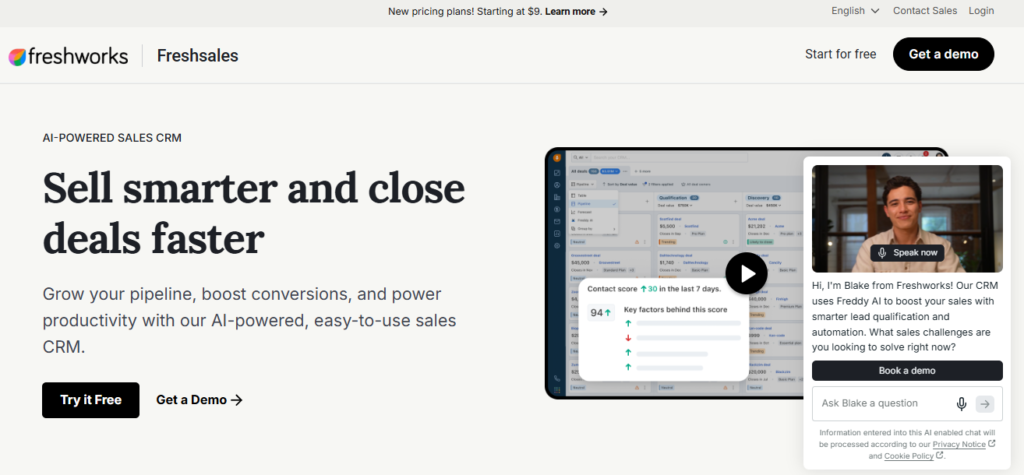
Freshsales – Sales CRM with built-in phone, email, and chat
Freshsales is a sales CRM from Freshworks. It has a free tier, and it puts calling, email, and chat inside the same screen where you manage deals. That means a rep can click a phone number, send a follow-up, and log the activity without opening another app.
It ranks sixth because the free plan is useful but tight, and the best features sit behind paid plans. Compared with Capsule CRM, which keeps things very simple, Freshsales gives you more communication tools out of the box. Compared with HubSpot CRM, it feels less like a platform and more like a focused sales desk.
Small sales teams that want one tool for contacts, deals, and outreach will get the most from it. A real estate group with fewer than 10 agents could use it as a starting point, but the best CRM for real estate lead generation and follow up usually needs automation that you may have to pay for. If you later add email campaigns, check how it fits with your marketing cloud software plans before you commit.
✅ Key Features
- Built-in phone: Reps can call leads from the contact record and keep call history attached to the deal.
- Email tracking: You can see when a prospect opens a message, so follow-ups land at a sensible time.
- Live chat: Website visitors can message your team, and those chats can turn into contact records.
- Visual pipeline: Deals move across stages in a board view that makes stalled opportunities easy to spot.
- Lead scoring: Contacts are ranked by activity, so reps call the warmest people first.
- Workflow automation: Routine steps like assigning new leads can run on rules instead of manual work.
✅ Pros
- You can work calls, emails, and chats from one record, which cuts app switching.
- The interface is clean, so new reps can usually start without long training.
- The free tier lets a tiny team test the basics before paying anything.
- Pipeline views make it simple to see which deals need attention today.
- It is a good fit if you already use other Freshworks products.
❌ Cons
- Many advanced features, such as deeper automation and reporting, require a paid plan.
- The free tier limits what a growing team can do, so you may outgrow it fast.
- Its app ecosystem is smaller than the one around HubSpot CRM, so some niche tools may lack easy connections.
- Phone features may involve extra setup or usage costs, so check the details before you rely on calling.
🎯 Best For: Small sales teams that want calling, email, and chat in one easy CRM. It suits a team that does lots of outreach and wants simple follow-up tracking without a long setup.
7. monday CRM

monday CRM – Work-management-based CRM with flexible boards and workflows
monday CRM is a sales tool built on the monday.com work management platform. Deals, contacts, and tasks live on visual boards that you can reshape without code. That is why it ranks here: a rep or an ops lead can change a pipeline stage or add a field in minutes.
Its edge over a pipeline-first tool like Pipedrive is what happens after the sale. When a deal closes, you can move straight into onboarding or project boards in the same account. Teams that already run work in monday.com, or that compare it with other team collaboration tools, will feel at home on day one.
The catch for this list is cost. monday has historically offered a free plan for its work management product, but CRM access has generally needed a paid plan or a trial. Check the current pricing page before you commit, since plan limits change.
✅ Key Features
- Custom boards: Build pipelines, lead lists, and account views that match how your team actually sells.
- Automations: Set rules that assign leads, update statuses, or send reminders so reps skip repetitive admin.
- Email and activity tracking: Keep messages and notes tied to each contact so the history stays in one place.
- Dashboards: Pull deal and workload data into charts that show where the pipeline is stuck.
- Integrations: Connect common email, calendar, and file tools so data does not get retyped.
- Work management link: Hand closed deals to delivery teams on boards in the same workspace.
✅ Pros
- The board layout is easy to learn, so new users can start with little training.
- You can change fields, stages, and views yourself without a developer.
- Sales and delivery teams can share one workspace, which cuts handoff errors.
- Dashboards are simple to set up and easy to share with managers.
- Automations are built with plain rules, so non-technical staff can manage them.
❌ Cons
- The CRM is not reliably free, so budget-only teams may hit a paywall fast.
- Heavy customization can turn boards messy if nobody owns the setup.
- Pricing can depend on seat counts and plan tiers, which makes costs harder to predict as you grow.
- Teams that only need basic contact tracking may find it more tool than they need.
🎯 Best For: Operations-minded teams, such as agencies or service firms, that want sales and project delivery in one workspace. It fits best when a closed deal quickly becomes a client project.
8. EspoCRM

EspoCRM – Open-source CRM you host and control yourself
EspoCRM is an open-source CRM. You download it, install it on your own server, and pay no license fee. That makes it a good pick when your data has to stay on hardware you control.
It ranks eighth because the setup asks more of you than the hosted tools above. HubSpot CRM works the day you sign up. EspoCRM needs a server, a database, and someone who can handle updates and backups. In return, you get access to the code and a long list of settings you can change without asking a vendor.
The closest alternative on this list is SuiteCRM, which is also free to self-host. EspoCRM has a cleaner, lighter interface, so it is often easier for a small team to learn. SuiteCRM goes wider on built-in modules. If your users will click around all day, the simpler screens of EspoCRM may matter more than extra depth.
✅ Key Features
- Self-hosted install: You keep customer records on your own server, so you decide where the data lives and who can reach it.
- Entity Manager: You can add custom record types and fields from the admin panel, so the CRM matches how your business works.
- Visual workflow rules: You can set up automatic actions when a record changes, which cuts down on manual updates.
- Open source code: Your developers can read and change the code, so you are not stuck waiting on a vendor’s roadmap.
- REST API: You can connect the CRM to your own systems, so contacts and deals move between tools without retyping.
- Role-based access control: You can limit which teams see which records, which helps when sales, support, and finance share one system.
✅ Pros
- The core software has no license fee, so your main cost is hosting and the time of the person who runs it.
- The interface is clean and quick to learn, so new sales reps can start logging deals fast.
- Custom fields and record types are easy to add, so you can model unusual sales processes.
- Self-hosting gives you full control over backups, location, and access, which helps with strict privacy rules.
- You can change the code if a feature is missing, so you are not limited to what a vendor allows.
❌ Cons
- You must install, secure, update, and back up the system yourself, so a team with no technical help will struggle.
- Some advanced features, such as certain extensions, are sold separately, so “free” covers the core but not everything.
- The ecosystem of apps and integrations is smaller than HubSpot or Zoho, so you may need custom work to connect other tools.
- There is no big vendor support desk for the free version, so you rely on documentation and the community when something breaks.
🎯 Best For: Small companies with a developer or IT person who want a CRM on their own server, such as a firm with strict data rules. It also suits teams that need custom record types and do not want to pay per-user license fees.
9. SuiteCRM

SuiteCRM – Open-source CRM you host and control yourself
SuiteCRM is an open-source CRM that began as a fork of SugarCRM’s old community edition. The software has no license fee, and you can run it on your own server or a hosting plan you pick. It covers sales, marketing, support and reporting in one package, which is more than most free tools give you.
It ranks ninth here because the free price comes with real work. Someone has to install it, patch it, back it up and fix it when an update breaks a custom module. Compare that with HubSpot CRM, where you sign up and start. SuiteCRM asks for more effort, but it has no contact caps, no locked features and no vendor deciding what stays free next year.
That makes it a fit for organizations with an IT person or a developer on call. A nonprofit, a school or a mid-sized firm with data rules can keep every record on its own hardware. Teams that want a hosted tool should look at EspoCRM or Zoho CRM instead.
✅ Key Features
- Sales pipeline management: Track leads, accounts, contacts and deals in one place without hitting a record limit.
- Workflow automation: Set rules that assign leads, send emails or update fields so reps skip repetitive admin.
- Campaign tools: Run email campaigns and track responses from the same system that holds your contact data.
- Case management: Log and route customer support issues so the sales and service teams see the same account history.
- Custom modules: Build your own record types and fields with the built-in tools or custom code to match how your business works.
- Reporting and dashboards: Build reports on pipeline, activity and revenue without paying for an analytics add-on.
✅ Pros
- There is no license cost, so your budget goes to hosting and setup instead of per-seat fees.
- You own the database, which helps when policy requires data to stay on your own servers.
- The open code lets a developer change almost anything, from screens to business logic.
- Sales, marketing and support tools ship together, so you do not need to stitch several apps together.
- No user cap in the software means adding staff does not raise the software bill.
❌ Cons
- Setup, updates and security patches fall on you, so a team with no technical help will struggle.
- The interface looks dated next to HubSpot or Pipedrive, and new users often need training time.
- Support comes from the community unless you pay a hosting partner or consultant, so urgent fixes can be slow.
- Heavy customization can make future upgrades harder, because custom code may need rework after a new release.
🎯 Best For: IT-capable organizations, such as nonprofits or mid-sized firms with a developer, that want a full CRM with no license fees and complete control of their data.
10. Salesforce Starter Suite
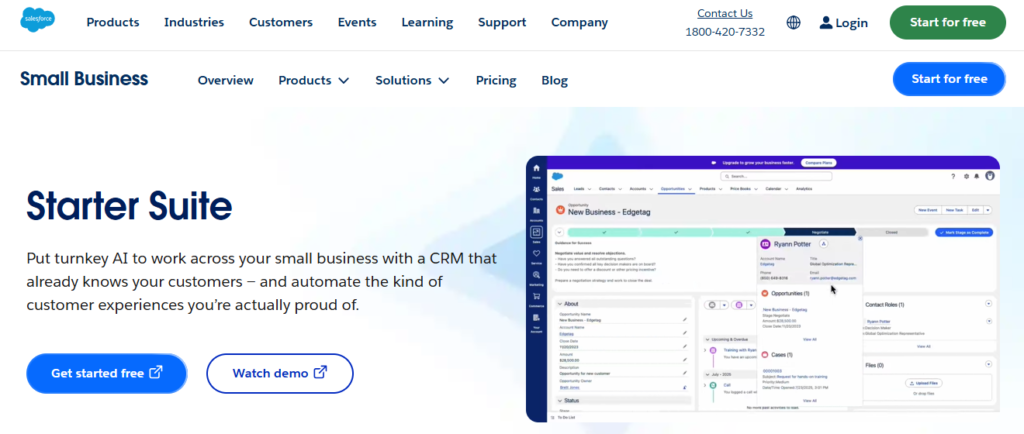
Salesforce Starter Suite – Enterprise-grade CRM built for small growing teams
Salesforce Starter Suite is the entry-level package from the biggest name in CRM. It is not free, so it sits last on this list. But it earns a spot because it puts sales, marketing, and basic service tools in one app, with a clear path into the wider Salesforce platform.
The main difference from HubSpot CRM or Zoho CRM is what happens later. If you outgrow Starter Suite, you move up to higher Salesforce editions without changing vendors or rebuilding your data from scratch. That matters most for a company that already expects to need complex reporting, custom objects, or a large partner network.
Still, pay for it only if that growth is likely. A solo freelancer or a three-person shop will get more from a free tool like Capsule CRM. Starter Suite makes sense when you want Salesforce habits, data structure, and admin skills in place before the team doubles.
✅ Key Features
- Guided setup: Walks new users through connecting email and importing contacts, so a small team can start without hiring an admin.
- Lead and opportunity management: Tracks each deal from first contact to close in one pipeline view.
- Email marketing tools: Lets you send campaigns and follow-ups from the same system that holds your contact records.
- Basic customer service tools: Gives you a way to log and answer customer questions without buying a separate help desk.
- Reports and dashboards: Shows pipeline and activity numbers so managers can spot stalled deals early.
- Upgrade path: Lets you move to higher Salesforce editions later while keeping your existing data and setup.
✅ Pros
- Sales, marketing, and service tools live in one app, so you avoid stitching together three products.
- The upgrade path means you will not face a painful CRM migration if the business grows fast.
- Salesforce skills are common, so hiring an admin or consultant later is easier than with niche tools.
- The setup is simpler than full Salesforce editions, which suits teams without technical staff.
- Salesforce’s large partner and app community gives you many add-on options as needs change.
❌ Cons
- It is a paid product, so it does not fit a team that needs a CRM at zero cost.
- Customization is more limited than in full Salesforce editions, so complex workflows may require an upgrade.
- Costs can rise as you add users and move to higher editions, which makes budgeting harder over time.
- Teams that never grow past a few users may pay for depth they will not use, unlike with HubSpot CRM’s free core.
🎯 Best For: Small businesses that expect fast growth and want to start on Salesforce now instead of migrating later. It suits a sales-led team with a budget that wants one system for leads, campaigns, and basic support.
Best Free CRM Software comparison table
Use this table to narrow the list fast, then read the full sections for the tools that fit your team.
| Tool Name | Best For | Key Strength | Integrations | Ease of Use | Platform Type |
|---|---|---|---|---|---|
| HubSpot CRM | Startups and small teams | Polished free core | Gmail, Outlook, Slack, Zoom | Easy, quick setup | Cloud (web, iOS, Android) |
| Zoho CRM | Budget-minded growing firms | Deep customization | Zoho apps, Gmail, Outlook | Moderate, setup needed | Cloud (web, iOS, Android) |
| Bitrix24 | Teams mixing sales and projects | CRM plus tasks and chat | Check vendor site | Moderate, busy menus | Cloud (web, desktop, mobile) |
| Capsule CRM | Freelancers and solo agents | Simple contact tracking | Gmail, Outlook, Check vendor site | Easy, no tutorial | Cloud (web, iOS, Android) |
| Pipedrive | Small sales teams | Visual deal pipeline | Check vendor site | Easy, fast pipeline setup | Cloud (web, iOS, Android) |
| Freshsales | Outreach-heavy teams | Built-in phone and chat | Freshworks products | Easy, clean screens | Cloud (web, iOS, Android) |
| monday CRM | Agencies and service firms | Flexible boards | Check vendor site | Easy, board layout | Cloud (web, iOS, Android) |
| EspoCRM | Teams with IT help | Self-hosted control | Check vendor site | Moderate, server setup | Self-hosted (web) |
| SuiteCRM | Nonprofits and mid-sized firms | No license fees | Check vendor site | Steep, dated interface | Self-hosted (web) |
| Salesforce Starter Suite | Fast-growing small firms | Clear upgrade path | Check vendor site | Moderate, guided setup | Cloud (web, iOS, Android) |
Final Verdict
If you want one free CRM and no fuss, start with HubSpot CRM. It is the easiest to learn, and the free plan does real work. If your sales process is odd and you expect to need custom fields and automation, Zoho CRM is the better bet. For a solo agent or freelancer, Capsule CRM does the basics with the least effort, which settles most hubspot vs salesforce for real estate agents questions for a one-person shop.
Pick Bitrix24 if one login for sales and project work matters more than a clean screen. Choose EspoCRM or SuiteCRM only if you have someone technical to run the server, and take EspoCRM if you want the easier interface. Pipedrive, monday CRM and Salesforce Starter Suite are not free, so choose them when pipeline clarity, project handoffs or long-term Salesforce growth is worth paying for.
Once your CRM is running, look at online reputation management software to keep an eye on reviews from the customers you track. For the rest of your stack, see our list of marketing tools for small business.